Best embroidery software for Mac
Embrizo is the best embroidery software for Mac: it auto-digitizes images in Safari or Chrome with nothing to install, writes PES, DST, JEF and six other formats, and starts at $8 a month. Other Mac options are Embrilliance (one-time, hand digitizing), Ink/Stitch (free, inside Inkscape), Ricoma Chroma (from $799.99 a year) and Janome Artistic Digitizer (from Janome dealers). Hatch, Wilcom EmbroideryStudio and Brother PE-DESIGN are Windows-only.
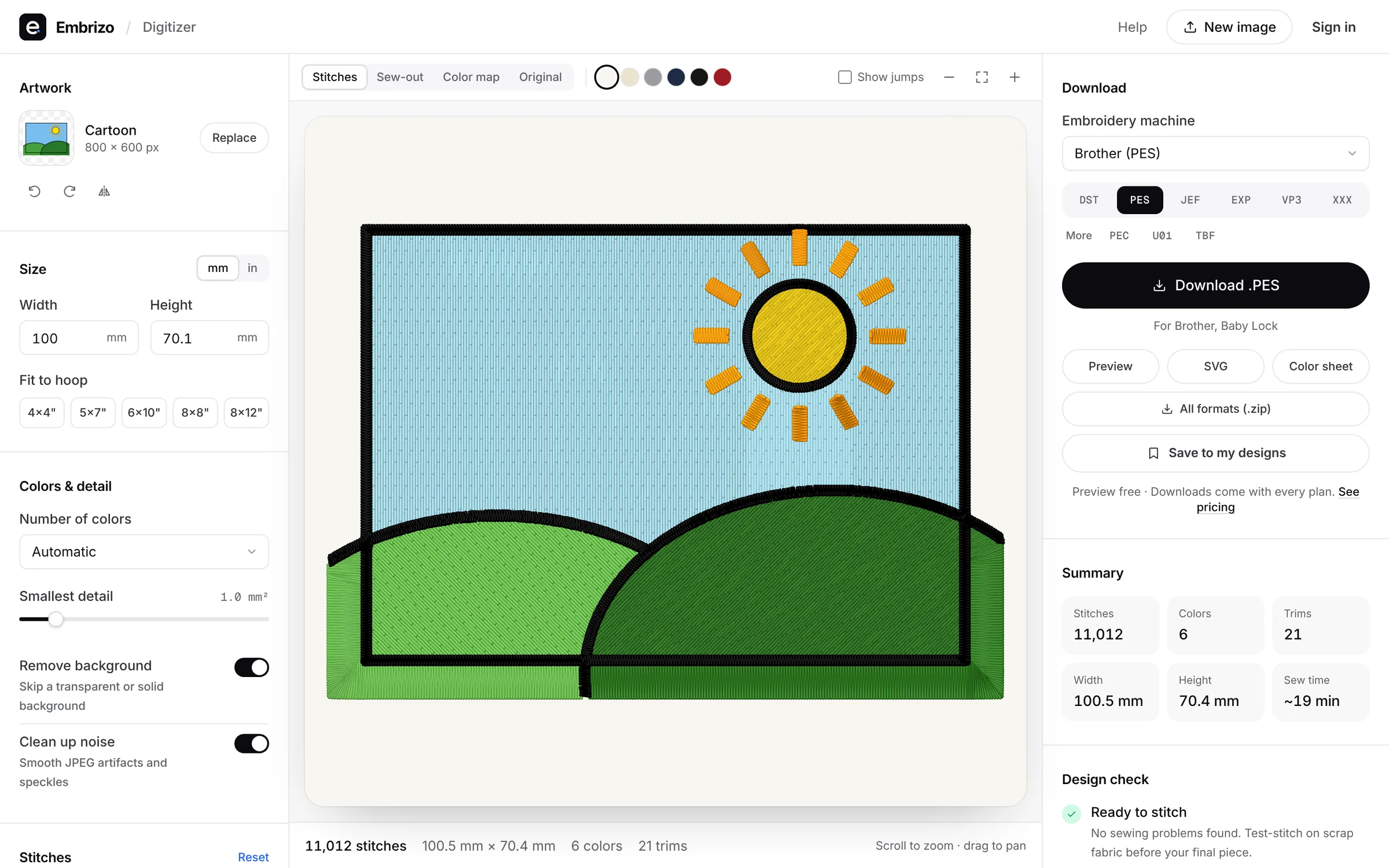
Most well-known digitizing programs are Windows-only. These run on a Mac without Parallels or Boot Camp.
- Top pick1Best overall for Mac
Embrizo
Browser auto-digitizer
MacAuto-digitizingFree accountUpload a logo or drawing in Safari or Chrome and get clean, ready-to-sew stitches in seconds, then download PES, DST, JEF or six other formats. Nothing to install, no Windows needed, and your designs follow you to any computer.
- Auto-digitizing on every plan
- Satin, fill and underlay chosen for your fabric
- Live stitch preview and sew-out before you download
- From $8 a month, a fraction of desktop software
- Works on
- Any browser: Windows, Mac, Linux, Chromebook
- Price
- Free account; downloads from $8 a month billed yearly
- 2Best for hand digitizing on a Mac
Embrilliance (Essentials and StitchArtist)
by BriTon Leap
MacAuto-digitizingFreeNative Mac and Windows apps, bought once. Essentials covers lettering and editing; StitchArtist lets you draw every stitch object yourself.
Watch out: No auto-digitizing: the vendor says StitchArtist isn't an auto-digitizer.
- Works on
- Mac and Windows
- Price
- One-time modules, from $159
- 3Best free option
Ink/Stitch
by the Ink/Stitch open-source project
MacAuto-digitizingFreeFree and open source, running inside the Inkscape vector editor on macOS 12 or later.
Watch out: You trace images and set up stitches yourself, and learn Inkscape first.
- Works on
- Windows, Mac and Linux, inside Inkscape
- Price
- Free and open source
- 4Best for Ricoma owners
Ricoma Chroma
by Ricoma
MacAuto-digitizingFreeRuns on Mac and Windows, with one-click auto-digitizing in every tier and support from the machine maker.
Watch out: The first year is paid up front, from $799.99.
- Works on
- Mac and Windows, online
- Price
- First year from $799.99, then monthly or yearly
- 5Best for Janome owners
Janome Artistic Digitizer 2.0
by Janome
MacAuto-digitizingFreeJanome's digitizing software runs on current macOS, including Apple silicon Macs, with image tracing and photo-stitch styles.
Watch out: Sold through Janome dealers; some styles are only in the full version, not Junior.
- Works on
- Mac and Windows
- Price
- From authorized Janome dealers; ask for pricing
Quick comparison
| Software | Works on | Auto | Price |
|---|---|---|---|
| Embrizo | Any browser: Windows, Mac, Linux, Chromebook | Yes | Free account; downloads from $8 a month billed yearly |
| Embrilliance (Essentials and StitchArtist) | Mac and Windows | No | One-time modules, from $159 |
| Ink/Stitch | Windows, Mac and Linux, inside Inkscape | No | Free and open source |
| Ricoma Chroma | Mac and Windows, online | Yes | First year from $799.99, then monthly or yearly |
| Janome Artistic Digitizer 2.0 | Mac and Windows | Yes | From authorized Janome dealers; ask for pricing |
Prices and features of other programs from each vendor's website, checked October 2026.
Not included: Hatch, Wilcom EmbroideryStudio, PE-DESIGN, SewArt, Embird, Floriani Total Control U, BERNINA Embroidery Software. Windows programs; on a Mac they need Windows in a virtual machine or emulation, and some vendors don't support that.
Not included: Artspira. A phone and tablet app for Brother wireless machines rather than Mac software.
Free account
See your design stitched before you buy anything
Create a free account to digitize any image, try every setting and watch it sew. Choose a plan only when you want to download files.
- Digitize and preview any image
- Realistic stitch preview and sew-out
- Download free ready-made designs
- No credit card needed


Questions
The quickest way to see what it does with your artwork is to try it. With a free account, digitizing and previewing cost nothing and take about a minute.
Is there embroidery digitizing software for Mac?
Yes. Embrizo works in Safari or Chrome on any Mac and auto-digitizes images with nothing to install. Embrilliance and Chroma also have Mac versions, and Ink/Stitch runs inside Inkscape on macOS.
Does Hatch work on a Mac?
Not natively. Hatch is Windows 11 software; on a Mac it needs Parallels or similar. Embrizo runs in the browser on a Mac and auto-digitizes like Hatch Composer, without Windows.
What is the best free embroidery software for Mac?
Embrizo's free account digitizes, previews and saves designs from images on a Mac, and includes a free design library; downloading your own designs needs a plan. Ink/Stitch is free and open source, but you set up every stitch yourself in Inkscape.
Can I make PES files on a Mac?
Yes. Embrizo turns any image into a PES file in the browser in seconds. Embrilliance can also save PES.
More comparisons
The fastest way from image to stitches
Sign up free, upload a logo or drawing and see it stitched in under a minute, on any computer.